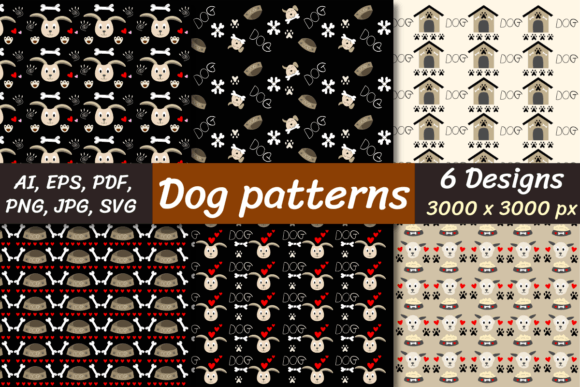
Dog Seamless Patterns
Whether you're designing pet-themed stationery, crafting custom apparel for a dog-loving small business, or building engaging social media assets for a rescue nonprofit, Dog Seamless Patterns offer a fast, professional way to add charm and consistency to your visuals. These aren’t just cute dog illustrations—they’re carefully engineered digital papers designed to tile flawlessly across any surface, from fabric mockups to website backgrounds, without visible seams or awkward repeats.
What Makes a Dog Seamless Pattern Actually Work?
A true seamless pattern means the edges align perfectly when repeated—left meets right, top meets bottom—so it looks like one continuous design, not a grid of copies. Many free or low-cost “dog patterns” online fail this basic test: zoom in, and you’ll spot misaligned paws, mismatched fur direction, or clipped ears at the borders. That breaks immersion instantly—especially on large-format prints or high-resolution screens.
The Dog Seamless Patterns bundle solves this by delivering six original, hand-crafted designs—all rigorously tested for tiling integrity at 3000 × 3000 pixels. Each is built with intentional spacing, balanced negative space, and consistent scale so dogs appear naturally distributed—not crowded or sparse—no matter how many times the pattern repeats.
Common Oversights (and How to Avoid Them)
Assuming all file formats behave the same way. It’s tempting to grab the PNG and move on—but that’s where problems start. A PNG with transparency works beautifully over colored backgrounds in Canva or PowerPoint, but won’t scale cleanly for embroidery digitizing or vector-based signage. Meanwhile, the included SVG, AI, and EPS files retain full editability: change colors, isolate individual pups, or resize infinitely without pixelation. Use PNGs for quick web use; reach for SVG or AI when precision, branding control, or production scalability matters.
Overlooking resolution needs before downloading. At 3000 × 3000 pixels, these digital papers support sharp printing up to ~10" × 10" at 300 DPI—a sweet spot for greeting cards, scrapbook sheets, or fabric swatches. But if you’re planning a 4' × 8' wall mural? You’ll need to repeat the pattern intentionally (not stretch it), or combine tiles using your design software’s pattern tool. The high-res base gives flexibility—but doesn’t replace smart layout planning.
Skipping the unzipping step—or assuming it’s trivial. These files come compressed in a ZIP archive for faster, safer delivery. But not every device opens ZIPs natively: older Windows laptops may require WinZip or 7-Zip; some iOS or Chromebook users need a compatible app. Don’t wait until deadline day to discover your system can’t extract the files. Test your unzipping software *before* purchase—or download a free utility like 7-Zip (Windows) or The Unarchiver (Mac) ahead of time.
Why File Variety Matters More Than You Think
This bundle includes JPG, PNG (with and without transparency), PDF, SVG, AI, and EPS—each serving a distinct purpose:
- JPG: Best for email attachments, simple web banners, or platforms that don’t support transparency.
- PNG (transparent): Ideal for overlaying on photos, creating stickers, or designing layered social posts.
- PDF: Preserves vector quality while staying universally viewable—great for sharing proofs with clients or printers.
- SVG / AI / EPS: Essential for cutting machines (Cricut, Silhouette), logo adaptation, or brand asset libraries where color, stroke, and grouping must stay editable.
Using the wrong format isn’t just inconvenient—it can cost time and money. For example, converting a JPG to vector manually often results in jagged edges or lost detail. With native AI and EPS files included, you skip that step entirely.
What to Check Before You Download or Buy
Before adding Dog Seamless Patterns to your cart, ask yourself three practical questions:
- Do I know which software I’ll use—and does it support the formats I need? If you work exclusively in Procreate, focus on the high-res PNGs. If you use Adobe Illustrator daily, prioritize SVG and AI.
- Will this pattern scale to my intended output? Review the 3000 × 3000 pixel dimensions against your project specs. A 24" × 36" poster at 150 DPI requires ~3600 × 5400 pixels—meaning you’d tile two copies horizontally and one vertically. That’s doable, but worth planning for.
- Is the style aligned with my audience? These patterns feature friendly, approachable dog silhouettes and playful arrangements—not hyper-realistic portraits or cartoonish caricatures. They suit brands emphasizing warmth, trust, and everyday joy—not clinical vet clinics or edgy streetwear (unless irony is intentional).
Real-World Use Cases That Benefit Most
A freelance educator creating printable dog-training worksheets uses the transparent PNGs to layer patterns behind text boxes—keeping content legible while adding visual appeal. A boutique pet store owner imports the SVG files into Cricut Design Space to cut custom-patterned iron-on transfers for bandanas. A blogger building a branded Pinterest pin drops the JPG into Canva, resizes it as a background, and overlays clean typography—done in under two minutes.
None of these workflows require advanced skills—but they *do* rely on having the right file type, resolution, and tiling reliability from the start. That’s the quiet advantage of a thoughtfully built bundle: less troubleshooting, more making.
A Final Practical Note
You’ll receive all six Dog Seamless Patterns in one ZIP file—no subscriptions, no watermarks, no usage limits for personal or commercial projects (always verify the license terms included with your download). Just unpack, open what fits your toolset, and begin applying. If you’ve ever spent hours trying to fake a seamless repeat in Photoshop—or paid for a pattern that cracked under zoom—this bundle is the grounded, efficient alternative.
Buy. Download. Unzip. Create—without second-guessing the foundation.