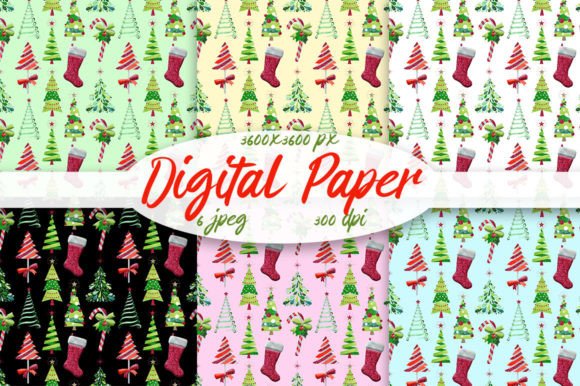
Patterns Christmas Tree Digital Paper
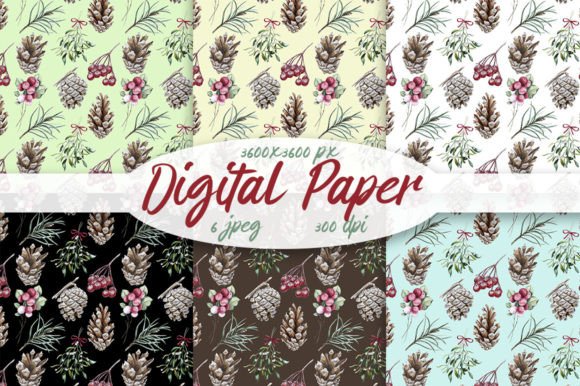
Looking for a versatile, high-resolution design asset that brings festive charm without the clutter? Patterns Christmas Tree Digital Paper delivers exactly that — six seamless, ready-to-use digital papers, each sized at 3600×3600 pixels and rendered at 300dpi for crisp, professional results. These aren’t just holiday-themed graphics; they’re functional creative tools built for real-world use across print, web, and product design.
What Makes These Digital Papers Stand Out?
Seamless patterns mean no visible repeats or awkward edges — essential when scaling backgrounds, wrapping digital gifts, or designing repeating elements for packaging or stationery. Each of the six designs features distinct Christmas tree motifs: think minimalist line art, vintage silhouettes, Scandinavian-inspired geometry, subtle watercolor textures, modern monochrome arrangements, and soft pastel clusters. The variation gives you stylistic flexibility without sacrificing seasonal cohesion.
The 3600×3600 pixel size ensures versatility: it’s large enough to print full-page scrapbook layouts or A4 greeting cards at true 300dpi, yet manageable for digital overlays in Canva, Photoshop, or Procreate. Because they’re delivered as JPEGs, there’s no software lock-in — open them in any image editor, upload them directly to print-on-demand platforms, or drag them into your CMS with zero compatibility concerns.
Creative Uses That Go Beyond “Just a Background”
Designers and small business owners often overlook how much visual consistency a well-chosen pattern adds to branded holiday content. With Patterns Christmas Tree Digital Paper, you’re not just selecting a background — you’re reinforcing tone, seasonality, and attention to detail.
- Printables & Stationery: Create cohesive sets — gift tags, thank-you cards, holiday planners, or classroom worksheets — where the pattern ties everything together visually. Use one design for headers, another for borders, and a third as a subtle watermark behind text.
- Digital Marketing Assets: Build Instagram story templates, email newsletter banners, or Pinterest pins that feel intentionally festive — not just slapped with clipart. Overlay light text or icons in contrasting colors to ensure readability against busier patterns.
- Product Mockups & Packaging: Apply these papers to flat-lay mockups for mugs, notebooks, tote bags, or gift wrap previews. Their seamless nature means you can tile them across curved surfaces or irregular shapes without distortion.
- Educational Resources: Teachers and curriculum designers can embed these into lesson slides, activity sheets, or digital handouts — adding visual warmth without overwhelming young learners. Try using the minimalist tree pattern as a gentle grid background for handwriting practice pages.
Adapting for Different Audiences and Goals
How you use Patterns Christmas Tree Digital Paper depends less on what it is and more on who you’re designing for — and why.
A freelance graphic designer pitching holiday branding packages might use one pattern as a base layer in a client’s social media kit, then recolor key elements (like tree trunks or ornaments) to match brand palettes. That small tweak maintains seasonal relevance while keeping visuals aligned with the client’s identity.
An educator preparing December literacy centers could print two patterns on cardstock — one for vocabulary flashcards (using trees as bullet points), another as a textured backdrop for student writing prompts (“Describe your dream Christmas morning”). The tactile quality of printed paper adds sensory engagement beyond screen-based learning.
For bloggers or content creators, these papers work beautifully as consistent visual anchors across a month-long holiday series. Use the same pattern across all featured post thumbnails, but vary typography, headline placement, and accent colors to avoid repetition fatigue. Consistency builds recognition; variation keeps it fresh.
Practical Tips for Best Results
Color accuracy matters — especially if you’re matching existing brand assets or coordinating with physical products. Remember the note: Colors may vary slightly due to different color monitors. To minimize surprises:
- Soft-proof your designs using sRGB for web or CMYK profiles for print (convert before sending to a printer).
- Test small-scale prints first — a single 5×7 inch card reveals how texture and contrast hold up in ink.
- When layering text over busy patterns, add a semi-transparent white or black overlay (10–20% opacity) behind type blocks to boost legibility without hiding the design.
- For social media, crop or scale thoughtfully — Instagram posts favor centered focal points, so consider how tree motifs align within common aspect ratios (e.g., 4:5 or 1:1).
Why Seamless Really Matters in Practice
“Seamless” isn’t just a buzzword here — it’s a time-saver and quality safeguard. Non-seamless patterns create visible seams when tiled, which breaks immersion in presentations, causes alignment headaches in layout software, and looks unprofessional in printed materials like wrapping paper or fabric swatches. With these six options, you get reliable tiling behavior out of the box — no manual cloning, offsetting, or blending required.
This reliability lets you focus on intention, not correction. Whether you’re building a Shopify store banner that stretches edge-to-edge or designing a printable Advent calendar grid, knowing the repeat works means fewer revisions and faster turnaround.
Getting Started Without Overcomplicating It
You don’t need advanced software or design training to benefit from Patterns Christmas Tree Digital Paper. Start simple:
- Open one JPEG in Canva, set it as a background, and add your logo or message in a clean sans-serif font.
- In PowerPoint or Google Slides, insert the pattern as a slide master background for all December presentations.
- Upload to your favorite print-on-demand service (like Printful or Gelato) and preview how it renders on mugs, notebooks, or phone cases — many platforms auto-tile seamlessly if the file meets their specs.
From there, experiment: invert colors, apply subtle noise filters for texture, or combine two patterns using layer masks to create custom hybrids. The goal isn’t perfection on day one — it’s building confidence through iteration.
Final Thought: Design Tools Should Enable, Not Limit
Good digital paper does more than fill space — it supports clarity, reinforces intent, and quietly elevates everyday communication. Patterns Christmas Tree Digital Paper fits that role because it’s precise, adaptable, and rooted in practical need. Whether you’re launching a limited-edition product line, prepping classroom materials, or refreshing your blog’s seasonal voice, these six patterns offer grounded starting points — not rigid templates.
Use them as-is, adapt them intentionally, or treat them as springboards for something entirely new. What matters most is that your final output feels purposeful — not just festive, but fitting.