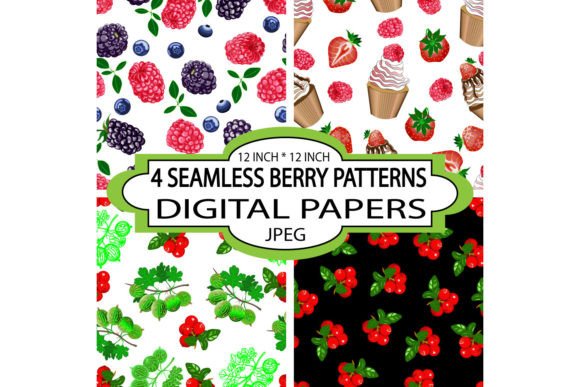
Seamless Patterns with Berry Fruits
Seamless Patterns with Berry Fruits are high-resolution, tileable digital designs—each precisely 12 inches by 12 inches at 3600px × 3600px—crafted to repeat flawlessly across any surface without visible seams, stripes, or alignment breaks. These aren’t just decorative motifs; they’re production-ready assets built for consistency and versatility. Whether you’re designing wallpaper for a boutique café, printing custom gift wrap for an e-commerce brand, or developing textile prints for a small-batch apparel line, these patterns eliminate the guesswork of tiling and scaling—so your output stays clean, professional, and on-brand.
Where They Fit in Your Creative Workflow
These patterns rarely exist in isolation. They enter your process at precise inflection points: during asset sourcing (before design begins), as foundational layers (mid-project), or as final polish (just before export or print). For interior designers, Seamless Patterns with Berry Fruits often serve as early-stage mood board anchors—helping clients visualize texture and tone before committing to full-scale renderings. For stationery designers, they function as structural elements: the background layer beneath typography, die-cut shapes, or foil accents. In fabric development, they act as scalable repeats that translate directly to digital loom files or screen-print separations—no manual tiling adjustments needed.
Because each pattern is delivered as a JPEG file, compatibility is immediate. No plugin dependencies, no proprietary software locks. Open them in Photoshop, Affinity Designer, Procreate, Canva, or even PowerPoint—and start using them within minutes. That simplicity accelerates iteration: test a berry-and-cupcake motif on a greeting card mockup, then reuse the same file for a fabric swatch PDF or social media banner, all while preserving resolution and color fidelity.
Practical Integration Across Use Cases
Real-world application depends less on the pattern itself and more on how it aligns with your existing tools and constraints. Here’s how professionals embed Seamless Patterns with Berry Fruits into daily execution:
- Interior Designers: Import the JPEG into SketchUp or Revit as a custom material. Adjust scale via UV mapping—not pixel stretching—to maintain crispness on walls, upholstery, or cabinet fronts. The vintage-elegant aesthetic pairs naturally with matte finishes and warm-toned palettes, reducing the need for additional color correction.
- Small-Business Owners (e.g., party planners, gift shops): Upload directly to Printful or Gelato for on-demand products. Because the 3600px dimension meets standard print bleed requirements, there’s no risk of cutoff or distortion on wrapping paper rolls or wall mural panels. Batch-upload four variations (raspberry, blackberry, blueberry, mixed berry) to create cohesive product families—streamlining inventory and marketing visuals.
- Digital Scrapbookers & Card Makers: Drag the JPEG into Cricut Design Space or Silhouette Studio as a fill pattern. Set it to “repeat” rather than “stretch” to preserve integrity across irregular shapes like scalloped borders or layered tags. The simple, uncluttered composition ensures text remains legible even when overlaid at 30% opacity.
- Educators & Workshop Facilitators: Use one pattern as a consistent visual thread across handouts, slide decks, and printable worksheets. Its gentle repetition supports cognitive flow without competing for attention—especially helpful when teaching layout principles or color theory to adult learners.
Preparation, Consistency, and Long-Term Usability
Before importing, rename files meaningfully—berry-cupcake-vintage-3600px.jpg, not IMG_1234.jpg. This supports quick retrieval across cloud folders, shared drives, or DAM systems. Store them alongside related assets: matching color palettes (HEX/RGB values), font pairings, and usage guidelines. Over time, this builds a lightweight brand system—even for solo creators.
Quality control starts with previewing at actual size. Zoom to 100% in your editor and scroll across repeated tiles. Look for subtle shifts in contrast, stray pixels along edges, or inconsistent spacing between berries and cupcakes. These patterns were built to avoid those issues—but verifying once per project prevents downstream surprises during large-format printing or high-DPI web exports.
For long-term use, treat each JPEG as a master source file. Never resave over it after edits. Instead, duplicate and label variants: _for-web, _for-print, _cropped-for-social. This preserves the original’s integrity and makes version rollback effortless—critical when juggling client revisions or platform-specific specs.
How They Interact With Other Tools and Decisions
Seamless Patterns with Berry Fruits don’t replace tools—they extend them. In Adobe Illustrator, apply them as pattern swatches to maintain vector flexibility. In Figma, use them as image fills inside auto-layout frames to scale responsively across device mockups. When paired with Pantone color libraries, their soft vintage tones help calibrate screen-to-print expectations early in the process.
They also influence adjacent decisions. Choosing a berry-based pattern may prompt a shift toward natural fiber substrates (linen, cotton) for physical products—or warmer white point settings in print profiles. It might inform typography choices: serif fonts with gentle serifs echo the elegance; rounded sans-serifs complement the cupcake playfulness. These aren’t arbitrary associations—they’re workflow efficiencies born from visual cohesion.
Compatibility extends beyond software. These JPEGs integrate cleanly with CMS platforms like Shopify (for product page backgrounds), WordPress (via page builders like Elementor), and email marketing tools (Mailchimp, Klaviyo) where uploaded images retain their seamless behavior within responsive templates—as long as the container width allows at least one full tile to display.
Implementation Tips You’ll Actually Use
– Scale intentionally: At 3600px × 3600px, these patterns hold detail at 300 DPI up to 12×12 inches. For larger surfaces (e.g., murals), scale uniformly—not stretched—and confirm your printer supports native 300 DPI raster input. Avoid upscaling in-browser; do it in Photoshop with “Preserve Details 2.0” enabled.
– Test on real substrates: Order a single 8×10” print on your target paper stock (kraft, metallic, matte) before bulk runs. Subtle berry textures can shift dramatically depending on absorbency and sheen.
– Layer thoughtfully: Place the pattern on its own layer, set to Multiply or Overlay if adding color overlays or text shadows. This retains editability and avoids flattening until final export.
– Organize by rhythm, not just subject: Group patterns by visual weight—light berry clusters for delicate stationery, denser arrangements for upholstery. This speeds up selection when matching to project tone, not just theme.
– Reuse intelligently: A single berry-and-cupcake pattern can become a border (by cropping a 1-inch vertical strip), a watermark (at 8% opacity), or a texture overlay (blended with noise layer). Its versatility multiplies ROI without requiring new purchases.
Why This Level of Craft Matters
In a landscape saturated with generic clipart and AI-generated filler, Seamless Patterns with Berry Fruits stand out because they’re engineered—not just assembled. The absence of unwanted stripes isn’t an aesthetic preference; it’s a functional guarantee that saves hours in manual cleanup. The vintage-elegant tone isn’t decorative fluff—it’s a deliberate bridge between nostalgia and modern usability, resonating across age groups and contexts without feeling dated or cloying.
When your workflow demands reliability, speed, and quiet sophistication—whether you’re prepping a client presentation, launching a seasonal product line, or building a personal creative archive—these patterns operate as silent collaborators. They don’t ask for attention. They deliver consistency. And they let you focus on what matters most: the idea, the message, the experience you’re designing.