24 Seamless Circle Patterns
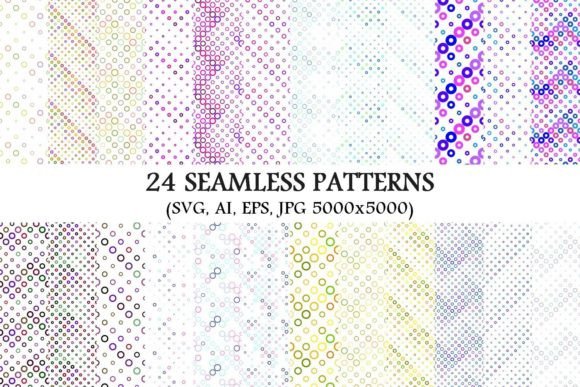
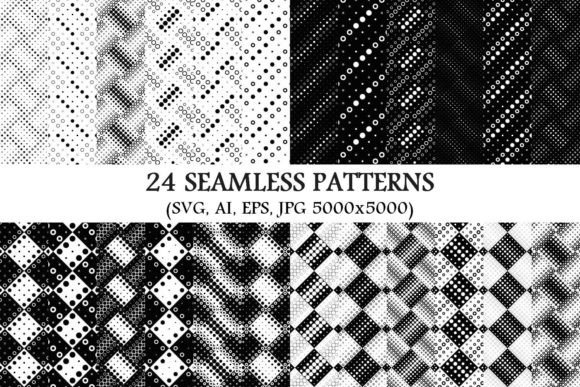
Imagine opening a single folder and finding 24 perfectly tiled circle-based backgrounds—each one ready to stretch infinitely across any surface without visible seams, borders, or repetition glitches. That’s what the 24 Seamless Circle Patterns package delivers: not just images, but versatile, production-ready design assets built for real-world use.
Every pattern is available in four formats: SVG (scalable and code-friendly), AI (editable in Adobe Illustrator), EPS (cross-compatible with older vector software), and high-res JPG (5000×5000 pixels, ideal for print or large-format digital displays). There are no watermarks, no subscriptions, no hidden layers—just clean, consistent, monochrome circle motifs designed to blend, contrast, or recede exactly as you need them to.
Why “seamless” matters—beyond the buzzword
A seamless pattern repeats flawlessly edge-to-edge. That means whether you’re tiling it across a website background, wrapping it around a product mockup, or printing it on fabric or stationery, there’s no awkward jump, no misaligned edge, no visual hiccup. For beginners, that eliminates hours of manual alignment and trial-and-error. For professionals, it saves time in client revisions and ensures pixel-perfect output at any scale.
Monochrome doesn’t mean minimal in impact—it means maximum flexibility. These circle patterns work equally well as subtle textures behind text, bold backdrops for social posts, or layered elements in branding systems. Because they’re grayscale (not black-and-white only), they adapt gracefully to light or dark themes, brand color overlays, and accessibility-compliant contrast settings.
For designers & illustrators
You’ll likely start with the SVG or AI files—editing stroke weights, adjusting spacing, or recoloring circles directly in your workflow. Need a softer texture? Lower the opacity of a layer. Want motion? Animate individual circles using CSS or After Effects. The vector precision means you can zoom into a 10-foot banner or shrink the same file into a favicon-sized element—no quality loss.
For educators & presenters
A teacher building a classroom slide deck might drop one of the JPGs onto a title slide—not as decoration, but as visual rhythm. Circles suggest connection, cycles, and continuity—ideal for lessons on ecosystems, timelines, or collaborative learning. Because all 24 patterns are monochrome, they won’t clash with school-branded templates or distract from student-facing content. No design skills needed: drag, resize, done.
For small business owners & marketers
If you manage your own social media, email newsletters, or Shopify store, these patterns help unify your visual voice fast. Use one as a consistent header background across Instagram Stories; apply another as a subtle overlay on product photos to add depth without hiding detail. Since every JPG is 5000×5000, you can crop tightly for Pinterest pins or stretch full-width for a landing page—no blurry stretching or awkward tiling.
For bloggers & content creators
Bloggers often overlook background consistency—but it builds recognition. A signature circle pattern behind pull quotes, section dividers, or sidebar widgets creates quiet cohesion across hundreds of posts. With 24 options, you can rotate styles by season, topic, or tone: tighter grids for technical posts, looser arrangements for reflective essays. And because they’re monochrome, they stay legible over varied photo backgrounds or text blocks.
For hobbyists & DIY crafters
Whether you’re laser-cutting greeting cards, designing sublimation mugs, or making custom washi tape, vector files give you control. Import the EPS into Cricut Design Space or Silhouette Studio, ungroup elements, and rearrange circles into new compositions—or cut them as standalone shapes. The high-res JPGs also work beautifully for printable wall art, scrapbook papers, or embroidery guides.
What actually changes depending on your goals
Your priorities shift based on what you’re making—and why.
- Ease of use matters most if you’re new to design tools. The JPGs require zero software—just open and place. SVGs work natively in Figma, Webflow, and modern browsers without plugins.
- Flexibility becomes critical when you’re iterating. Vector formats let you adjust radius, spacing, line thickness, or even convert circles to dots, dashes, or halftones—all non-destructively.
- Commercial reliability means knowing you can use these patterns in client projects, merchandise, or apps without licensing risk. All files are royalty-free for personal and commercial use—including SaaS interfaces and printed products.
- Long-term usefulness shows up in format variety. You might start with JPGs for quick edits today—but keep the AI files archived for future rebranding, where tweaking a single anchor point could refresh an entire visual system.
Real examples—no hypotheticals
A freelance UX writer uses Pattern #7 (a low-density grid of thin outlined circles) as a soft background layer behind mobile app wireframes—adding spatial context without competing with interface elements.
A yoga studio owner applies Pattern #19 (interlocking solid circles) to the header of their Mailchimp newsletter, then recolors it in CSS to match their seasonal indigo-to-cream palette—no designer required.
A middle-school science teacher prints Pattern #3 (concentric rings) on transparency film, layers it over diagrams of sound waves or atomic orbitals, and projects it during class—helping students visualize frequency and resonance physically.
A ceramicist imports Pattern #12 (offset dotted circles) into her pottery glaze design software, scales it to fit mug curvature, and etches the motif onto bisqueware before firing—turning a digital asset into tactile craft.
Does this match *your* next project?
If you need backgrounds that scale cleanly, integrate smoothly into existing tools, and support both simplicity and sophistication—yes, 24 Seamless Circle Patterns fits.
If you’re looking for photorealistic textures, animated loops, or color-rich gradients—this isn’t that package. It’s intentionally focused: precise, monochrome, circular, and seamless. Its strength lies in restraint—not flashiness.
Beginners appreciate the immediate usability. Seasoned users value the editable vectors and consistent construction. Educators rely on its clarity. Entrepreneurs trust its reuse rights. And creators return to it because it quietly supports intention—whether that’s calm focus, rhythmic repetition, or elegant minimalism.
No pattern here tries to be everything. Instead, each one solves a specific visual problem: how to fill space thoughtfully, how to suggest unity without shouting, how to build rhythm without rigidity. That’s why 24 feels generous—not excessive. Enough variety to choose with purpose. Enough consistency to trust the outcome.