Rose Flowers Seamless Patterns Bundle: A Practical Guide for Designers, Makers, and Small Businesses
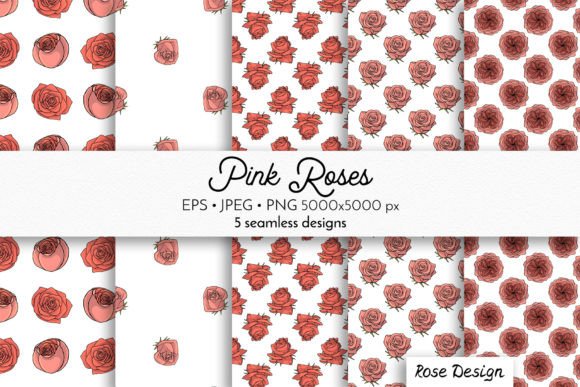
Seamless patterns are foundational assets in visual design—quietly powerful, endlessly adaptable, and deeply functional. Among the most universally resonant motifs is the rose, especially when rendered with botanical authenticity and soft, hand-drawn charm. The Rose Flowers Seamless Patterns Bundle delivers precisely that: a curated collection of five distinct, high-fidelity seamless patterns featuring pink rose blooms, drawn by hand and engineered for real-world versatility. Unlike generic floral repeats or AI-generated abstractions, this bundle emphasizes tactile warmth, print-ready precision, and technical flexibility—making it equally valuable to a textile designer developing a new fabric line, a small-batch stationery maker sourcing wrapping paper graphics, or an educator preparing classroom craft resources.
Why Seamless Patterns Matter Beyond Aesthetics
A seamless pattern isn’t just a repeating image—it’s a functional system. When tiles align perfectly at their edges, the result eliminates visible seams across large surfaces: think wall murals, fabric yardage, or custom-printed tote bags. This technical integrity directly impacts production quality and perceived professionalism. For creators working with sublimation printing on polyester apparel or mugs, even a slight misalignment in tile boundaries can cause visible “ghost lines” or color shifts. The Rose Flowers Seamless Patterns Bundle addresses this at the source: each pattern is constructed using vector-based precision (EPS10) and rigorously tested for edge continuity in both raster and vector environments. That means no guesswork, no manual tiling corrections, and no costly reprints due to repeat failure.
What’s Inside: File Types, Dimensions, and Real-World Implications
The bundle includes three complementary file formats—each serving a specific stage of the creative workflow:
- 5 JPG files (5000×5000 px): Optimized for high-resolution print applications like gift wrap, greeting cards, and large-format posters. At 300 DPI, these files scale cleanly up to ~16.7 inches square—ideal for standard poster sizes and desktop publishing software such as Adobe InDesign or Affinity Publisher.
- 5 EPS10 vector files: The technical backbone of the collection. EPS10 preserves full editability—paths remain crisp at any scale, and colors can be adjusted non-destructively using global swatches or live paint tools. This is essential for branding consistency: imagine applying the same rose motif across business cards, packaging, and website banners—all recolored to match your brand palette without generating new assets.
- 5 PNG files with transparent background: Designed for digital layering and mixed-media projects. Use them in Canva templates, Procreate illustrations, or web overlays where background independence matters—like adding subtle rose texture to a product mockup or embedding a pattern into a layered scrapbooking collage.
This tri-format structure reflects how professionals actually work—not in isolation, but across platforms and output channels. A textile studio might start with the EPS to adjust stem density before exporting to JPG for loom calibration; a cardmaker may drop the PNG directly into Cricut Design Space for foil-layer registration; an educator could import the JPG into Google Slides to create printable pattern-recognition worksheets.
Hand-Drawn Authenticity Meets Production-Ready Precision
The phrase “hand-drawn pink rose blooms” carries more weight than stylistic preference—it signals intentionality in line weight, petal variation, and organic rhythm. Unlike algorithmically generated roses with uniform symmetry or overly saturated gradients, these illustrations include subtle imperfections: slight asymmetry in bloom shape, gentle tapering in stem thickness, and nuanced leaf veining. These details foster visual trust—viewers subconsciously register them as human-made, not synthetic. That authenticity translates directly to emotional resonance in end products: a pillowcase feels more personal, a wedding invitation more heartfelt, a boutique label more distinctive.
Yet authenticity doesn’t compromise utility. Each rose motif was deliberately simplified—not flattened into abstraction, but distilled to its essential botanical cues. Petals retain soft curvature, stamens suggest depth without requiring microscopic detail, and negative space between blooms ensures clarity even when scaled down to 2-inch swatches on fabric samples. This balance makes the Rose Flowers Seamless Patterns Bundle unusually adaptable: it reads clearly on a silk scarf at 80 DPI and holds definition on a 1200-DPI fine-art giclée print.
Use Cases Across Disciplines
The strength of a well-built pattern bundle lies in its ability to serve divergent needs without customization. Consider how different users apply these rose patterns:
- Textile & Apparel Designers: Integrate EPS files directly into CAD software like Browzwear or Optitex for digital fabric development. Adjust repeat size to match garment panel dimensions—e.g., reduce tile scale for narrow bias tape or expand for full-width quilting cotton.
- Small-Business Product Developers: Use the transparent PNGs to mock up rose-patterned ceramic mugs in Photoshop, then export layered PSDs to print-on-demand partners like Printful or Gelato—bypassing complex RIP setup while maintaining color fidelity.
- Educators & Workshop Leaders: Print the JPGs at low resolution for tactile sorting activities (e.g., “match the repeat unit to the full pattern”), or project vector outlines onto whiteboards to teach symmetry and tessellation concepts in middle-school math or art curricula.
- Scrapbookers & Paper Crafters: Layer the PNGs over scanned watercolor backgrounds in Procreate; use clipping masks to confine roses to custom die-cut shapes like hearts or leaves—no raster artifacts or edge fringing.
- Interior Design Freelancers: Import EPS files into SketchUp or Revit via vector plugins to visualize rose-patterned wallpaper on 3D room models—testing scale and proportion before client presentations.
Technical Considerations for Long-Term Usability
While aesthetics draw initial interest, longevity depends on technical stewardship. The Rose Flowers Seamless Patterns Bundle anticipates common pain points:
- Color Management: All files are delivered in CMYK and RGB color spaces, with embedded ICC profiles. This prevents unexpected hue shifts when moving from screen proofing (RGB) to commercial offset printing (CMYK).
- Sublimation Readiness: The 5000×5000 JPGs exceed minimum resolution requirements for most sublimation presses (typically 150–300 DPI at final output size), reducing pixelation risk on curved surfaces like ceramic mugs or phone cases.
- Recoloring Efficiency: EPS10 files use ungrouped, logically named layers (e.g., “Petals,” “Stems,” “Leaves”)—not flattened artwork. Designers can select entire bloom groups and apply global color changes in seconds, rather than manually adjusting dozens of anchor points.
- Licensing Clarity: The bundle permits commercial use—including resale of physical products (e.g., printed scarves, greeting cards)—without per-unit fees or attribution requirements. This removes friction for entrepreneurs scaling handmade businesses.
How It Fits Into Broader Design Trends
In recent years, consumers have shifted toward tactile, nature-connected aesthetics—what design researchers term “biophilic resonance.” Roses, particularly in soft pinks and muted tones, align with this movement: they evoke care, tradition, and quiet elegance without feeling dated. Simultaneously, the rise of print-on-demand platforms and home-based craft studios has increased demand for plug-and-play assets that don’t require advanced technical skills. The Rose Flowers Seamless Patterns Bundle sits squarely at that intersection: it offers heritage-inspired visuals with contemporary technical scaffolding. It avoids trend-chasing—no neon gradients, no distressed textures—but instead invests in timeless execution: clean vectors, generous resolution, and thoughtful file architecture.
Practical Implementation Tips
Getting maximum value from the bundle doesn’t require specialized software—but knowing a few shortcuts helps:
- For quick recoloring in Adobe Illustrator: Select all elements → click “Recolor Artwork” → use the “Edit” tab to shift hues globally while preserving light/dark relationships.
- To test repeat integrity: Place the JPG in Photoshop, enable “Pattern Preview” (View > Pattern Preview), then zoom to 400% and pan across tile boundaries—look for micro-gaps or pixel misalignments.
- For sublimation prep: Open the EPS in Illustrator, outline all strokes, then export as PNG at 300 DPI with “Use Artboards” unchecked—this preserves exact tile dimensions without added canvas space.
- To adapt for social media: Use the transparent PNG at 10% opacity as an overlay on Instagram story templates—creates subtle texture without competing with text legibility.
Ultimately, the Rose Flowers Seamless Patterns Bundle functions less like a static download and more like a modular toolkit—one that grows in usefulness as your projects evolve. Whether you’re prototyping a new pillow line, designing curriculum materials, or launching a stationery brand, its combination of botanical sincerity, technical rigor, and cross-format readiness makes it a quietly indispensable resource—not because it shouts for attention, but because it simply works, consistently, across contexts.