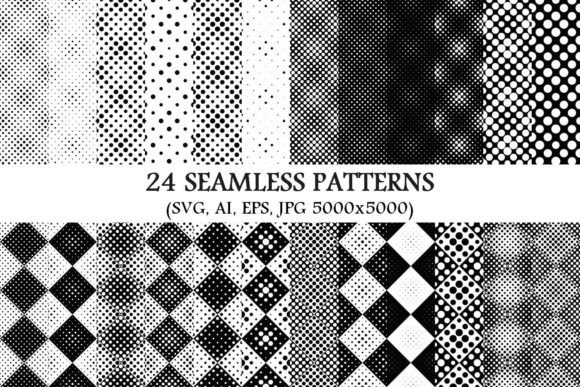
24 Seamless Monochrome Dot Patterns: A Practical Guide for Designers, Educators, and Creative Professionals
Whether you're crafting a minimalist brand identity, designing classroom learning materials, or building a sleek website background, seamless monochrome dot patterns offer quiet sophistication with surprising versatility. The 24 Seamless Monochrome Dot Patterns package—featuring 24 vector SVG, 24 vector AI, 24 vector EPS, and 24 high-resolution JPG files (5000×5000 pixels each)—is more than just a collection of dots. It’s a thoughtfully curated toolkit designed for real-world creative workflows.
What Does “Seamless” and “Monochrome” Actually Mean?
Let’s start with the fundamentals. A seamless pattern is one that tiles infinitely without visible edges, gaps, or misalignments. When repeated across a surface—like a webpage background, fabric print, or presentation slide—it creates a smooth, uninterrupted visual rhythm. You’ve likely seen this in subtle notebook textures, wallpaper designs, or app interface overlays. If you zoom in and see a hard line or a mismatch where tiles meet, it’s not seamless.
Monochrome, meanwhile, doesn’t just mean “black and white.” In design practice, it refers to variations of a single hue—including grayscale (shades of black, gray, and white), or tonal variations of navy, charcoal, olive, or slate. This package focuses on clean, neutral monochrome palettes—ideal for accessibility, professional printing, and cross-platform consistency.
Why Dot Patterns? The Quiet Power of Repetition
Dots may seem simple—but their psychological and functional impact is profound. Research in visual perception shows that evenly spaced, rhythmic elements like dots support focus and reduce cognitive load. That’s why educators use dot-grid notebooks for handwriting and note-taking; why UI designers apply subtle dot textures behind text to improve readability; and why architects specify dot-patterned acoustic panels to diffuse sound without visual clutter.
Unlike bold florals or geometric motifs, monochrome dot patterns operate at the periphery of attention. They add depth and tactility without competing with content—making them perfect for:
- Web and app interfaces: Subtle backgrounds that enhance hierarchy without distraction
- Educational handouts and worksheets: Calming visual anchors that support neurodiverse learners
- Branding and packaging: Sophisticated texture for luxury goods, tech startups, or wellness labels
- Print-on-demand products: Fabric, stationery, and wall art with consistent, scalable resolution
- Presentation decks: Professional slides that feel intentional—not generic
What’s Inside the Package—and Why Format Variety Matters
The package delivers 24 distinct dot patterns, each available in four essential formats:
- SVG (Scalable Vector Graphics): Perfect for web use—lightweight, responsive, and sharp at any screen size. Ideal for CSS backgrounds, HTML banners, or interactive dashboards.
- AI (Adobe Illustrator): Fully editable vectors—change dot size, spacing (called “repeat unit”), color, or alignment with precision. Great for customizing patterns to match your brand palette.
- EPS (Encapsulated PostScript): Industry-standard for print production. Compatible with older design software and preferred by commercial printers for reliable output.
- JPG (5000×5000 pixels): High-res raster files for immediate use in Photoshop, Canva, PowerPoint, or social media tools—even if you don’t own vector software.
This multi-format approach reflects how creatives actually work today. A teacher might drop a JPG into Google Slides for tomorrow’s lesson. A freelance designer may open the AI file to adjust spacing before exporting for a client’s packaging mockup. A developer could embed the SVG directly into a site’s CSS using background-image: url(...). No single format fits all needs—and that’s by design.
A Note on Resolution: Why 5000×5000 Pixels Is Strategic
At first glance, 5000×5000 may seem excessive for a background image. But consider real usage: printing a large-format poster at 150 DPI requires ~2800 pixels wide; a retina-display banner on a modern MacBook Pro needs ~3840 pixels. Starting with 5000×5000 ensures crisp results across all outputs—including future-proofing for higher-resolution displays and large-scale physical applications like murals or exhibition walls.
Common Misconceptions—Debunked
Misconception #1: “Dot patterns are outdated or boring.”
Not at all. Contemporary design trends—from quiet luxury to digital minimalism—rely heavily on restrained, repeatable textures. Think of Apple’s product page backgrounds, The New York Times’ editorial illustrations, or Duolingo’s playful-but-precise UI elements. Dots provide structure without shouting.
Misconception #2: “I need advanced software to use these.”
False. While AI and EPS files unlock full editing power, the JPGs work instantly in free tools like Canva, Keynote, or even Microsoft Word. Many users begin with JPGs, then upgrade to vectors as their projects scale.
Misconception #3: “One dot pattern is basically the same as another.”
Far from it. These 24 patterns vary meaningfully in dot size, spacing density, grid alignment (square, diagonal, hexagonal), and edge treatment (soft-edged vs. crisp). A tight 2-pt dot grid feels technical and precise; a loose, organic scatter evokes handmade paper. Each serves a different communicative purpose.
Educators & Instructional Designers
Use light-gray dot patterns as worksheet backgrounds to gently guide eye movement during reading exercises. Print them on transparency sheets for overlay tracing activities—or layer them beneath student-created digital artwork to add subtle dimension without overwhelming composition.
Small Business Owners
A café owner can apply a warm charcoal dot pattern to menu boards, loyalty cards, and Instagram story templates—creating instant cohesion across touchpoints. Because all files are monochrome, they adapt seamlessly to seasonal color updates (e.g., swapping black dots for deep green in December) without redesigning layouts.
UX/UI Designers
Instead of defaulting to solid-color backgrounds, try a low-opacity monochrome dot layer behind form fields or navigation bars. It adds micro-texture that improves visual separation while maintaining WCAG contrast compliance—especially helpful for users with visual processing differences.
Students & Researchers
When compiling thesis documents or conference posters, subtle dot patterns lend academic rigor and polish. Unlike flashy gradients or stock photos, they signal intentionality—not decoration for its own sake.
Getting Started: Three Practical First Steps
- Preview & Organize: Open the JPGs in any image viewer. Sort them by density (sparse → dense) or alignment (grid → diagonal → organic). Name folders intuitively—e.g., “Subtle Backgrounds,” “Bold Textures,” “Print-Ready.”
- Test Responsiveness: Upload an SVG to a test webpage and resize your browser window. Watch how the pattern scales—no blurring, no tiling artifacts. That’s the value of true vector seamlessness.
- Experiment with Opacity: In Photoshop or Figma, place a dot pattern over a photo or color block at 5–15% opacity. You’ll often find this creates richer depth than a flat overlay—proving that less truly is more.
Final Thought: Patterns Are Infrastructure, Not Decoration
In an age of algorithmic feeds and fleeting attention, thoughtful repetition offers stability. These 24 seamless monochrome dot patterns aren’t just “graphics”—they’re foundational design infrastructure. They help organize space, support cognition, unify brands, and elevate everyday communication. Whether you’re launching a startup, teaching fifth-grade math, or building your portfolio, investing in versatile, well-engineered patterns pays dividends across projects, platforms, and years.
And because they’re monochrome and resolution-agnostic, they won’t date quickly. What feels current today—clean, calm, confident—will still serve you meaningfully five years from now. That’s not just convenience. It’s design integrity.